Beverly: A Display Font That Commands Attention
Let's be honest, not every project needs a quiet, background font. Sometimes, you need your typography to walk into the room and own it. That's the exact space Beverly was designed to fill. This isn't just another decorative typeface; it's a statement piece, built from the ground up for moments where impact is non-negotiable. If you're working on a project that demands to be seen—whether it's a brand launch, a poster series, or a standout social media campaign—understanding what Beverly offers is the first step toward creating something memorable.
The Visual Personality of Beverly
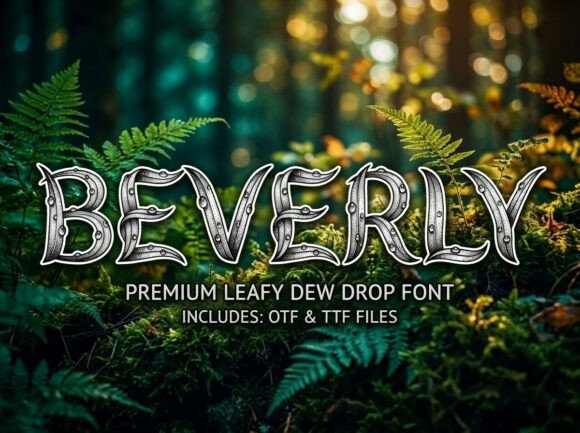
At its core, Beverly is a stunning decorative display font with a strong, artistic personality. Its letterforms are crafted with unique details that set it apart from standard serif or sans serif fonts. Think of it as the typographic equivalent of a bold piece of statement jewelry or a striking architectural feature. Each capital letter is designed to be a mini work of art, featuring unexpected curves, flourishes, or geometric cuts that create a cohesive yet eye-catching visual rhythm. This level of detail means it's not designed for body text; its strength lies in short, high-impact applications where its character can shine without overwhelming the viewer.
The design strikes a careful balance. It's bold enough to grab attention but maintains a professional and polished finish that prevents it from looking childish or overly whimsical. This makes Beverly a versatile creative font for serious commercial work, bridging the gap between artistic flair and corporate credibility.
Where Beverly Truly Shines: Practical Applications
Knowing a font is "decorative" is one thing; knowing exactly where to deploy it is what makes the difference in a professional workflow. Beverly's all-caps, high-impact nature makes it ideal for specific, strategic uses.
- Brand Identity & Logo Design: For brands that want to project confidence, modernity, and a touch of luxury, Beverly can be the cornerstone of a logo design. It works exceptionally well for fashion labels, boutique agencies, high-end cosmetics, or any startup aiming for a premium feel. Its unique letterforms ensure the logo is instantly recognizable.
- Packaging Design: On a shelf or in an online store, packaging has seconds to make an impression. Beverly can elevate product names, making them pop against minimalist backgrounds. It's perfect for artisanal goods, specialty foods, or tech gadgets where the packaging itself is part of the brand experience.
- Headlines & Hero Sections: Use Beverly for the main headline on a website's homepage, a blog post title, or the header of a digital brochure. It sets the tone immediately and encourages visitors to engage with the content that follows.
- Social Media Graphics: In the endless scroll of a social feed, Beverly can be your secret weapon. It's fantastic for quote graphics, announcement posts, sale banners, and profile headers where you need text to be legible and compelling even at a glance.
- Print & Editorial Layouts: Think magazine covers, event posters, book titles, and chapter headings. In editorial design, a strong display typeface like Beverly creates visual hierarchy and draws the reader's eye to key sections.
- Merchandise & Invitations: For T-shirt slogans, tote bag prints, or wedding invitation suites that break from tradition, Beverly adds an artistic, contemporary edge.
Making Beverly Work for Your Project Goals
Simply liking a font isn't enough; it needs to serve your project's objective. Here’s how to think strategically about integrating Beverly.
Aligning Typography with Brand Voice: What does your brand or project sound like? Beverly speaks in a tone that is confident, modern, and slightly avant-garde. If your brand voice is friendly and casual, Beverly might create a disconnect. But if you're aiming for sophistication, creativity, or bold innovation, it's a natural fit. Always match the font's personality to the message you want to send.
The Art of Font Pairing: A display font like Beverly should rarely be used alone for all text. The key to professional presentation is pairing it with a more neutral, readable font for body copy. Consider combining it with:
- A clean, geometric sans serif font for a modern, minimalist look.
- A classic, elegant serif font for a touch of timeless sophistication.
- Even a simple handwritten font can create an interesting contrast for certain creative projects.
Test your pairings side-by-side. Does Beverly overpower its companion, or do they create a balanced dialogue? The goal is harmony, not competition.
Readability Considerations: Remember, Beverly is an ALL-CAPS display typeface. This is a crucial detail. Using all capitals for long sentences or paragraphs drastically reduces readability. Its power is in short bursts—a name, a tagline, a headline, a single powerful word. Respect its design by using it where its impact is maximized, not where it will frustrate readers trying to digest a paragraph.
Working with the Beverly Font Files
When you invest in a premium font, you expect professional-grade assets. Beverly is delivered as both OTF and TTF files, covering all your needs. The OTF file is the professional standard, offering advanced typographic features and superior scalability for design software like Adobe Illustrator or InDesign. The TTF file ensures universal compatibility, meaning you can use Beverly seamlessly across different devices, operating systems, and even in basic word processors if needed. This dual-file offering is a mark of a quality design asset, ensuring your workflow remains smooth whether you're designing in a pro suite or creating a quick social media post.
A final, practical note: always review the full character set of any font before purchasing. With Beverly, you know upfront that it's uppercase only. This transparency is vital for planning your layouts and ensures there are no surprises during your design process. For projects that absolutely require lowercase letters, you'll need to plan to pair it with another typeface that includes them.
In the end, choosing a display font like Beverly is about making a deliberate choice to stand out. It’s for the moments when blending in is not an option. Used thoughtfully, it becomes more than just letters on a page—it becomes a core part of your visual storytelling, helping to build recognition, engage your audience, and present your work with undeniable confidence.